> ## Documentation Index
> Fetch the complete documentation index at: https://docs.busha.io/llms.txt
> Use this file to discover all available pages before exploring further.

# Transfers

> Understand how to create and manage transfers in Busha. Execute quotes and move funds between accounts.

A **Transfer** in Busha Business is the execution of a previously created Quote. While a Quote describes the proposed terms of an asset transfer, a Transfer is the actual process of moving those assets between sources and destinations according to those terms.

Transfers are the core mechanism through which all asset movements happen on the Busha platform. This includes depositing funds, converting between currencies, or sending payouts to external accounts.

## The Relationship Between Quotes and Transfers

Understanding the relationship between Quotes and Transfers is fundamental to using Busha Business:

* **Quote**: Describes the proposed transaction (exchange rates, amounts, fees)

* **Transfer**: Executes the transaction and tracks its progress

### The workflow is always

1. Create a Quote to lock in rates and terms
2. Present the Quote details to your user for confirmation
3. Create a Transfer using the Quote ID to execute the transaction
4. Monitor the Transfer status to track completion

<Note>
  **A Quote must be created before a Transfer can be initiated.** The Quote
  locks in the exchange rate and transaction terms, ensuring that when you
  execute the Transfer, you get exactly what was quoted.
</Note>

## Core Components of a Transfer

When you create or retrieve a Transfer, the response contains several important components:

### Transfer Identification

* **`id`**: The unique identifier for the transfer (e.g., `TRF_abc123xyz`)
* **`quote_id`**: Reference to the Quote that defined the terms of this transfer
* **`reference`**: An additional reference identifier for tracking
* **`profile_id`**: The ID of the profile (business or customer) that owns this transfer

### Asset Details

* **`source_currency`**: The currency being sent (e.g., BTC, NGN)
* **`target_currency`**: The currency being received (e.g., USD, BTC)
* **`source_amount`**: The amount of source currency being transferred
* **`target_amount`**: The amount of target currency being received
* **`trade`**: The type of trade (`buy` or `sell`)

### Transfer Channels (`pay_in` and `pay_out`)

The `pay_in` and `pay_out` objects specify how assets move into and out of the transfer:

#### `pay_in` - Where the source assets come from

* Account balance
* Cryptocurrency address
* Bank account (temporary or permanent)
* Mobile money account

#### `pay_out` - Where the target assets go to

* Account balance
* Cryptocurrency address
* Bank account
* Mobile money account

These objects contain detailed information including addresses, account numbers, blockchain hashes (for crypto), and expiration times (for temporary accounts).

### Rate and Fees

* **`rate`**: The exchange rate object showing the conversion rate used, which currency pair, and the rate type (FIXED/FLOATING)
* **`fees`**: An array of fee objects detailing any charges applied to the transfer

### Status and Timeline

* **`status`**: The current status of the transfer (e.g., `pending`, `processing`, `completed`, `funds_refunded`)
* **`timeline`**: A detailed object showing the transfer's progress through various stages
* **`status_description`**: A human-readable description of the current status

## Transfer Status Lifecycle

Understanding the different statuses of your transfers helps you keep track of your funds and provide accurate information to your users. Here's a concise, tabulated view of what each status means:

<table style={{ width: "100%", borderCollapse: "collapse" }}>
  <thead>
    <tr>
      <th style={{ width: "20%", textAlign: "left", padding: "12px" }}>
        Status
      </th>

      <th style={{ width: "20%", textAlign: "left", padding: "12px" }}>Code</th>

      <th style={{ width: "45%", textAlign: "left", padding: "12px" }}>
        Description
      </th>

      <th style={{ width: "15%", textAlign: "left", padding: "12px" }}>
        Final for
      </th>
    </tr>
  </thead>

  <tbody>
    <tr>
      <td style={{ padding: "12px" }}>Pending</td>

      <td style={{ padding: "12px" }}>
        <code>pending</code>
      </td>

      <td style={{ padding: "12px" }}>
        Transfer initiated; funds not yet received. Waiting for assets to
        arrive.
      </td>

      <td style={{ padding: "12px" }}>—</td>
    </tr>

    <tr>
      <td style={{ padding: "12px" }}>Processing</td>

      <td style={{ padding: "12px" }}>
        <code>processing</code>
      </td>

      <td style={{ padding: "12px" }}>
        Funds received and being handled; progressing to the next stage.
      </td>

      <td style={{ padding: "12px" }}>—</td>
    </tr>

    <tr>
      <td style={{ padding: "12px" }}>Cancelled</td>

      <td style={{ padding: "12px" }}>
        <code>cancelled</code>
      </td>

      <td style={{ padding: "12px" }}>
        Transfer cancelled (e.g., user cancelled, quote expired, validation
        failed); will not proceed.
      </td>

      <td style={{ padding: "12px" }}>—</td>
    </tr>

    <tr>
      <td style={{ padding: "12px" }}>Completed</td>

      <td style={{ padding: "12px" }}>
        <code>completed</code>
      </td>

      <td style={{ padding: "12px" }}>
        Transfer fully processed and finalized; assets reached their
        destination.
      </td>

      <td style={{ padding: "12px" }}>—</td>
    </tr>

    <tr>
      <td style={{ padding: "12px" }}>Funds Received</td>

      <td style={{ padding: "12px" }}>
        <code>funds\_received</code>
      </td>

      <td style={{ padding: "12px" }}>
        Payment successfully received for a deposit. Often the terminal step for
        simple deposits.
      </td>

      <td style={{ padding: "12px" }}>Deposits</td>
    </tr>

    <tr>
      <td style={{ padding: "12px" }}>Funds Converted</td>

      <td style={{ padding: "12px" }}>
        <code>funds\_converted</code>
      </td>

      <td style={{ padding: "12px" }}>
        Currency conversion completed (e.g., NGN→BTC, BTC→USD). Terminal for
        balance-to-balance conversions.
      </td>

      <td style={{ padding: "12px" }}>Conversions</td>
    </tr>

    <tr>
      <td style={{ padding: "12px" }}>Outgoing Payment Sent</td>

      <td style={{ padding: "12px" }}>
        <code>outgoing\_payment\_sent</code>
      </td>

      <td style={{ padding: "12px" }}>
        Payment initiated and sent on our end; funds are en route to the
        destination.
      </td>

      <td style={{ padding: "12px" }}>—</td>
    </tr>

    <tr>
      <td style={{ padding: "12px" }}>Funds Delivered</td>

      <td style={{ padding: "12px" }}>
        <code>funds\_delivered</code>
      </td>

      <td style={{ padding: "12px" }}>
        Funds reached the destination. Typically the final step for payouts and
        withdrawals.
      </td>

      <td style={{ padding: "12px" }}>Payouts/Withdrawals</td>
    </tr>
  </tbody>
</table>

## Transfer Completion Flow

Different types of transfers follow different paths through the status lifecycle. Here's how each type typically progresses:

### Deposits

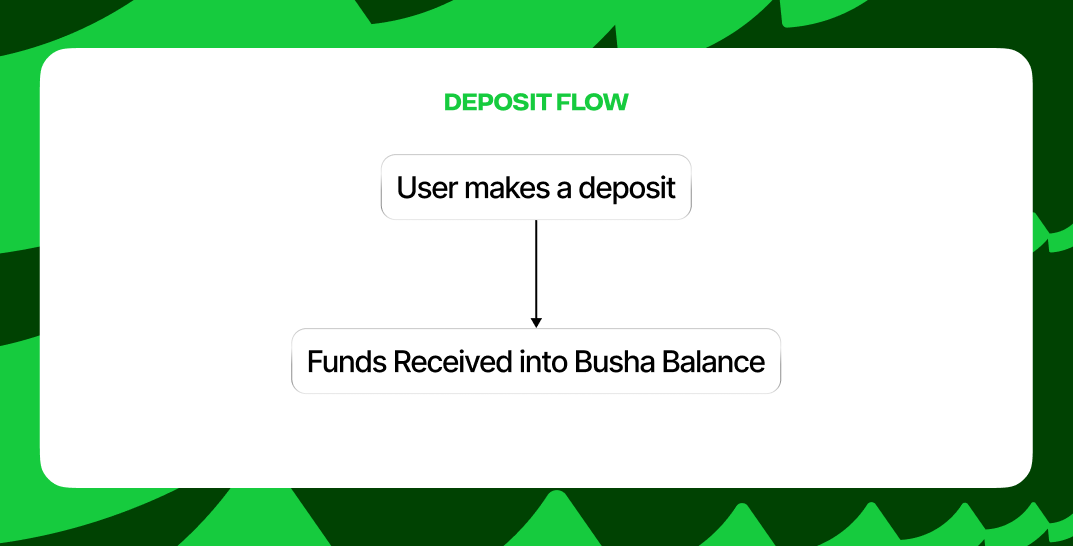
A deposit will typically follow this flow and stop at **Funds Received**:

<img src="https://mintcdn.com/busha-36f167ef/gBxYGMQrF1F-qJM7/images/deposit-flow.png?fit=max&auto=format&n=gBxYGMQrF1F-qJM7&q=85&s=a742f792ce64c9b7fd4ab916b3b199f0" alt="Deposit Flow for Busha Transfer" style={{ display: "block", margin: "0 auto" }} width="1073" height="546" data-path="images/deposit-flow.png" />

<p
  style={{
textAlign: "center",
marginTop: "8px",
fontSize: "14px",
color: "#6B7280",
}}
>
  Deposit Flow for Busha Transfer
</p>

### Conversions

A conversion will conclude with **Funds Converted** as its final status:
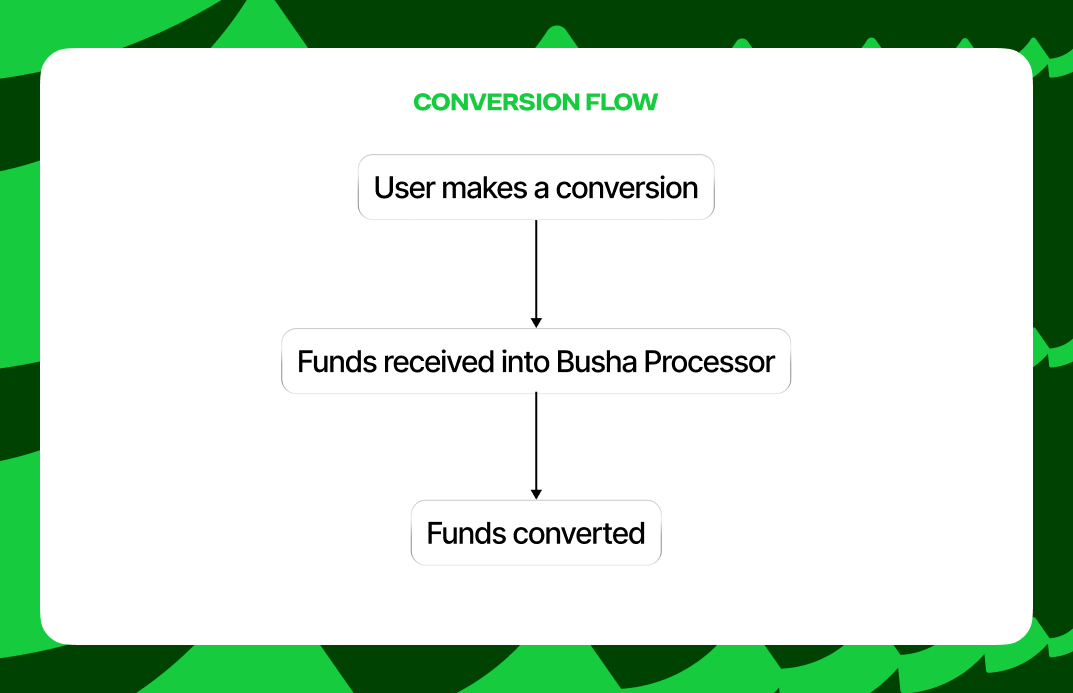
<img src="https://mintcdn.com/busha-36f167ef/gBxYGMQrF1F-qJM7/images/conversion-flow.png?fit=max&auto=format&n=gBxYGMQrF1F-qJM7&q=85&s=47091c0844c835f35007b2e9cd442d1b" alt="Conversion Flow from currency to currency" style={{ display: "block", margin: "0 auto" }} width="1073" height="693" data-path="images/conversion-flow.png" />

<p
  style={{
textAlign: "center",
marginTop: "8px",
fontSize: "14px",
color: "#6B7280",
}}
>
  Conversion Flow from currency to currency
</p>

### Payouts / Withdrawals

A payout or withdrawal will reach its final status at **Funds Delivered**:
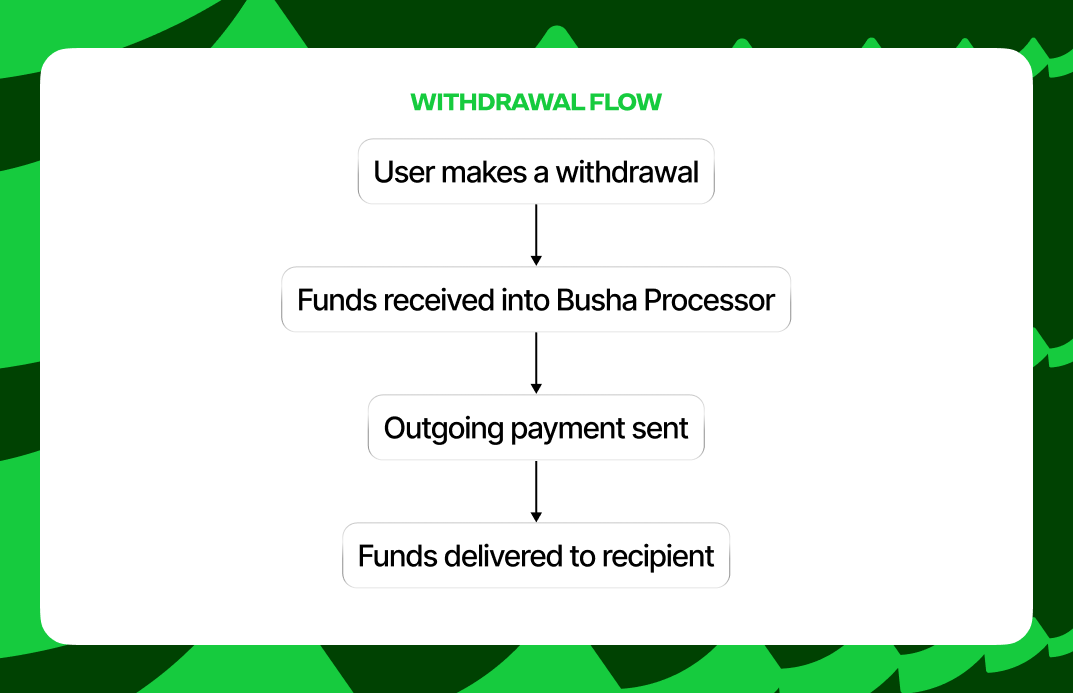
<img src="https://mintcdn.com/busha-36f167ef/gBxYGMQrF1F-qJM7/images/withdrawal-flow.png?fit=max&auto=format&n=gBxYGMQrF1F-qJM7&q=85&s=2825517d38906beae284d7e5c30dd2e5" alt="Withdrawal Flow on Busha" style={{ display: "block", margin: "0 auto" }} width="1073" height="693" data-path="images/withdrawal-flow.png" />

<p
  style={{
textAlign: "center",
marginTop: "8px",
fontSize: "14px",
color: "#6B7280",
}}
>
  Withdrawal Flow on Busha
</p>

## Transfer Timeline

Every Transfer includes a `timeline` object that provides detailed insight into the transfer's progress. This object contains:

* **`total_steps`**: The total number of steps this transfer will go through
* **`current_step`**: Which step the transfer is currently on
* **`transfer_status`**: The current high-level status
* **`events`**: An array of timeline events showing the history of the transfer

Each event in the timeline includes:

* **`step`**: The step number
* **`done`**: Whether this step is completed
* **`status`**: The status at this step
* **`title`**: A short title for the step
* **`description`**: A detailed description of what happened
* **`timestamp`**: When this event occurred

This timeline is invaluable for providing detailed status updates to your users and for debugging any issues with transfers.

## Best Practices for Working with Transfers

### 1. Always Create a Quote First

Never attempt to move assets without first creating a Quote. The Quote ensures:

* Rate certainty for your users
* Fee transparency
* Validation that the transfer is possible
* Protection against rate fluctuations during user confirmation

### 2. Check Quote Expiration

Always check the `expires_at` field of your Quote and create the Transfer before it expires. If a Quote expires, create a new one with current rates.

### 3. Monitor Transfer Status

Use webhooks or polling to monitor transfer status and provide real-time updates to your users. The `timeline` object provides detailed progress information.

### 4. Handle Failures Gracefully

Transfers can fail for various reasons (insufficient funds, invalid accounts, network issues). Always check the transfer status and `status_description` for error details, and provide clear feedback to users.

### 5. Store Transfer IDs

Always store the Transfer ID returned when you create a transfer. You'll need this ID to:

* Check transfer status
* Provide support
* Reconcile transactions
* Generate reports